To write AI video prompts with camera moves, describe one shot in this order: the subject, what it does, how the camera moves, and the light and look. Name the move in plain film words, such as push in, pull out, orbit, tracking or crane up, and give it one direction and one speed. Then paste it into the Video studio, pick Seedance 2.0, Kling 3.0 or Google Veo 3.1, and press Generate Video. A 5 second Kling 3.0 clip costs 110 credits, and drafts on Seedance 1.5 Pro, the studio default, cost 25 for 5 seconds at 720p.
A prompt that only describes a scene leaves the camera to chance, and the model often picks a slow drift. This article gives the camera moves that video models follow most reliably, a prompt for each, and the mistakes that make clips look messy.
What you need
- An idea for one shot: who or what is in it, one action, and where the camera should go.
- A Kinoseed account and some credits. Generating starts with a plan; the default Seedance 1.5 Pro clip, 5 seconds at 720p, costs 25 credits, which the $10 Basic plan (500 credits a month) covers.
Step by step
- 1
Start with the subject and one action
Lead with who or what the shot is about and the single thing that happens: "A cyclist rides down a tree-lined avenue". One action per clip. A 5 second clip has no room for a story.
- 2
Name one camera move, with a direction and a speed
Add the move as its own sentence: "Slow tracking shot alongside her at the same speed" or "The camera cranes up and over the wall". Direction (in, out, left, around, up) and speed (slow, fast, steady) do most of the work. Two moves in one clip usually turn into a wobble.
- 3
Add the light, lens and look
Finish with what the shot looks like: golden hour, neon at night, overcast; a wide lens or a close-up at 50mm; shallow depth of field, film grain. This sets the mood without competing with the move.
- 4
Pick the Model and settings in the Video studio
Open the Video studio, click the Model card and choose a model that takes text: Seedance 2.0, Kling 3.0 and Google Veo 3.1 all do. Set the shape, Resolution and Duration; a camera move reads best over 5 seconds or more. To start from your own picture, add it as the start frame and the move is applied to it.
- 5
Press Generate Video and adjust one thing at a time
The cost is on the button before you press it. If the camera does the wrong thing, change only the camera sentence and run it again, so you know what fixed it. A failed run is refunded automatically and there is no watermark.

Prompts to copy
Paste any of these into Video studio as a starting point, then change the details to fit your photo.
Push in
A chef plates a single dessert in a quiet restaurant kitchen. Slow, steady push in from a medium shot to a close-up of her hands. Warm tungsten light, shallow depth of field.
Pull out and rise
A lone hiker stands on a rocky summit at sunrise. Drone pull-out rising up and away, tilting up to reveal a sea of clouds below. Epic scale, golden light.
Orbit
A dancer spins slowly in an empty warehouse, dust in the light beams. The camera orbits her in a smooth half circle at chest height. Hard backlight, slow motion.
Tracking
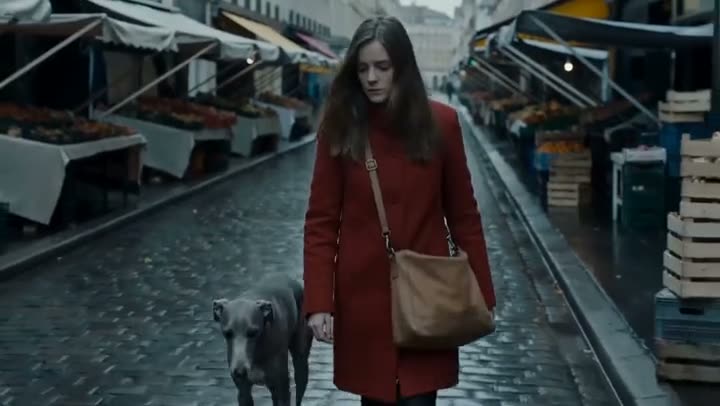
A woman in a red coat walks briskly along a wet cobbled street at dusk. Tracking shot alongside her at the same pace, the shop lights sliding past behind. 35mm, film grain.
Crane up
A street musician plays violin on a busy square. The camera starts at his feet and cranes slowly up past him to a wide view of the whole square. Overcast, soft light.
Locked off
A cat sits on a windowsill watching the rain, then turns its head toward the camera. Locked-off camera, no movement. Soft grey daylight, calm.
Moves that work, and moves that fight each other
Reliable in one clip: push in (or dolly in), pull out, orbit or arc, tracking alongside, crane up or down, a slow pan, a handheld drift, and locked off when you want the subject to do all the moving. Faster moves such as a crash zoom or a whip pan work best when the prompt says nothing else is changing.
Fighting combinations: an orbit plus a zoom, a pan plus a tilt in opposite directions, or any move plus "cut to". If you need a sequence of shots, make each one its own clip, or use Cinema Studio, which turns one brief into a wide, a medium and a close-up.
Which model, and what it costs
Seedance 2.0 costs 280 credits for 5 seconds at 720p with sound included. Kling 3.0 costs 110 for 5 seconds; its motion has weight, which suits people. Google Veo 3.1 costs 150 for 4 seconds at 720p and runs up to 4K. All three follow named camera moves. See pricing, or read Seedance 2.0 vs Kling 3.0 and Kling 3.0 vs Google Veo 3.1 to choose.
More examples
Tips for better results
- Put the camera in its own sentence. Mixed into the scene description, it is easy for the model to miss.
- Use words a camera operator would: push in, pull out, orbit, track, crane, pan, tilt, handheld, locked off.
- Draft the move cheap. Test the camera sentence on Seedance 1.5 Pro at 25 credits a clip, then run the keeper on the model you want.
- Give the move room. A full orbit in 4 seconds is fast; ask for a half circle, or choose a longer Duration.
- Start from a picture you like. Make the frame in the Image studio, then animate it with the same camera sentence in Image to Video.
Frequently asked questions
Do AI video models understand camera terms?
Seedance 2.0, Kling 3.0 and Google Veo 3.1 follow plain film terms like push in, orbit, tracking and crane up well, especially when the move has its own sentence with a direction and a speed. Rare jargon is less reliable than simple words.
Why does the camera do something different from my prompt?
Usually because the prompt asks for two moves, or the action and the move pull in different directions. Keep one move, say how fast, and say what stays still.
How long should a clip with a camera move be?
Five seconds or more gives a move time to read. Seedance 2.0 runs 5, 8 or 10 seconds, Kling 3.0 5 or 10, and Google Veo 3.1 4, 6 or 8.
What does one clip cost?
Generating starts with a plan. A 5 second Seedance 2.0 clip at 720p costs 280 credits, a 5 second Kling 3.0 clip 110, and a 4 second Google Veo 3.1 clip at 720p 150. The exact price is on the Generate Video button before you run it.
Try it on your own shot.
Video studio is open to explore. The price of a run is on the button before you spend anything.