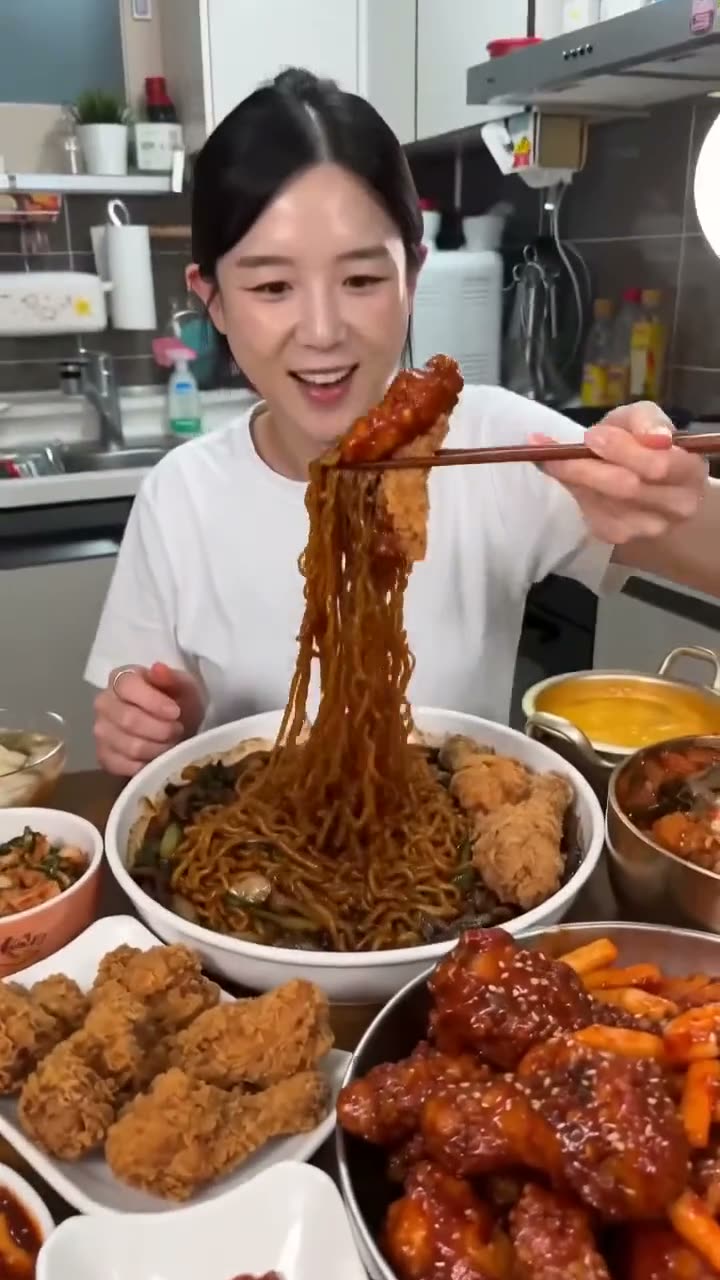
An AI mukbang video puts a person behind an eating-show table without anyone cooking, filming or eating anything. Mukbang started in South Korea as live broadcasts of hosts eating large meals while talking to viewers, and the format moved to YouTube and TikTok years ago. The AI version took off because the visual grammar is so recognisable: ring light, phone framing, a crowded table, an oversized first bite and a big reaction. That makes it easy to recognise in a feed and easy to remake with your own face.
This article shows how to make one from a single photo with Kinoseed's Mukbang tool, and how to pick the spread and the moment so the clip works as a hook.
What you need
- A clear photo of the presenter, head and shoulders is enough. Your own face, or someone who has agreed to it.
- A Kinoseed account with credits. A 5 second clip at 480p is 130 credits, so it needs more than the 50 free credits new accounts start with.
Step by step
- 1
Upload photo
Drop in the photo of whoever is presenting. A front-facing, evenly lit face works best; the table will take up most of the frame, so head and shoulders is plenty.
- 2
Choose The spread
Four options: Noodles (bowls in chilli broth with fried chicken and side dishes), Seafood (crab legs, prawns and shellfish in butter), Dessert (pancakes, doughnuts and an ice cream tower) and Barbecue (a tabletop grill with marinated meat and lettuce leaves).
- 3
Pick The moment
First bite lifts an enormous mouthful to camera with a delighted reaction, the standard opener. Reveal leans back to show the whole spread with both arms, which works well as a hook. Verdict chews, thinks, then gives the camera a firm thumbs up.
- 4
Set Aspect, Length and Res, then Generate Video
9:16 is selected for you, which is right for TikTok, Reels and Shorts. Length is 5, 8 or 10 seconds and Res runs from 480p to 4K; the credit cost on the button updates as you change them. The clip renders on Seedance 2.0 and lands in the feed below.
Why the AI mukbang trend works
Three things carry it. The format is instantly readable, so viewers know what they are watching in the first frame. The food is the spectacle, so glossy close-ups and an absurd quantity do the work. And the reaction gives the clip an ending, which is what keeps people watching to the loop.
The variations that travel furthest change one of those three: an unlikely presenter (a grandparent, a colleague in a suit, both with their blessing), an unlikely spread, or a reaction that goes wrong.
Adding sound
The clip comes back silent. Real mukbang leans heavily on sound, so add it in your editor: crunching, slurping and chopsticks on a bowl. You can make those effects in Kinoseed's audio studio and lay them under the clip.
Turning one clip into a series
Keep the photo and change the spread each time, and you have a week of posts with a consistent host. To put the same person into other formats, try Plushies, Rap Battle or Copy a Trend, which redoes a viral video with you in it.
More examples
Tips for better results
- Draft at 480p and 5 seconds. Once a spread and moment land, render the keeper at 720p or higher.
- Use Reveal for the first second of a post. It shows the whole table at once, which is what stops the scroll.
- Pick a photo with a neutral expression. The reaction is added for you, and a face that is already laughing has nowhere to go.
- Post the series with the same caption template, for example the dish name and a rating out of ten, so viewers recognise it.
Frequently asked questions
What is an AI mukbang video?
A short eating-show clip made with AI instead of a camera: a presenter behind a table of food, eating and reacting to the viewer. With the Mukbang tool, the presenter is the person in your photo.
Is it free?
New accounts get 50 free credits, and a 5 second clip at 480p costs 130, so you need to top up to make one. The smallest pack is $10 for 500 credits.
Which AI model does it use?
Seedance 2.0, starting from your photo as the first frame.
Can I choose my own food?
The tool offers four spreads: Noodles, Seafood, Dessert and Barbecue. For a specific dish, start from a still of yourself with that dish made in the image studio and animate it in the video studio.
Can I use someone else's photo?
Only with their permission. Kinoseed's terms prohibit impersonating a real person without consent.
Try it on your own shot.
Mukbang is open to explore. The price of a run is on the button before you spend anything.