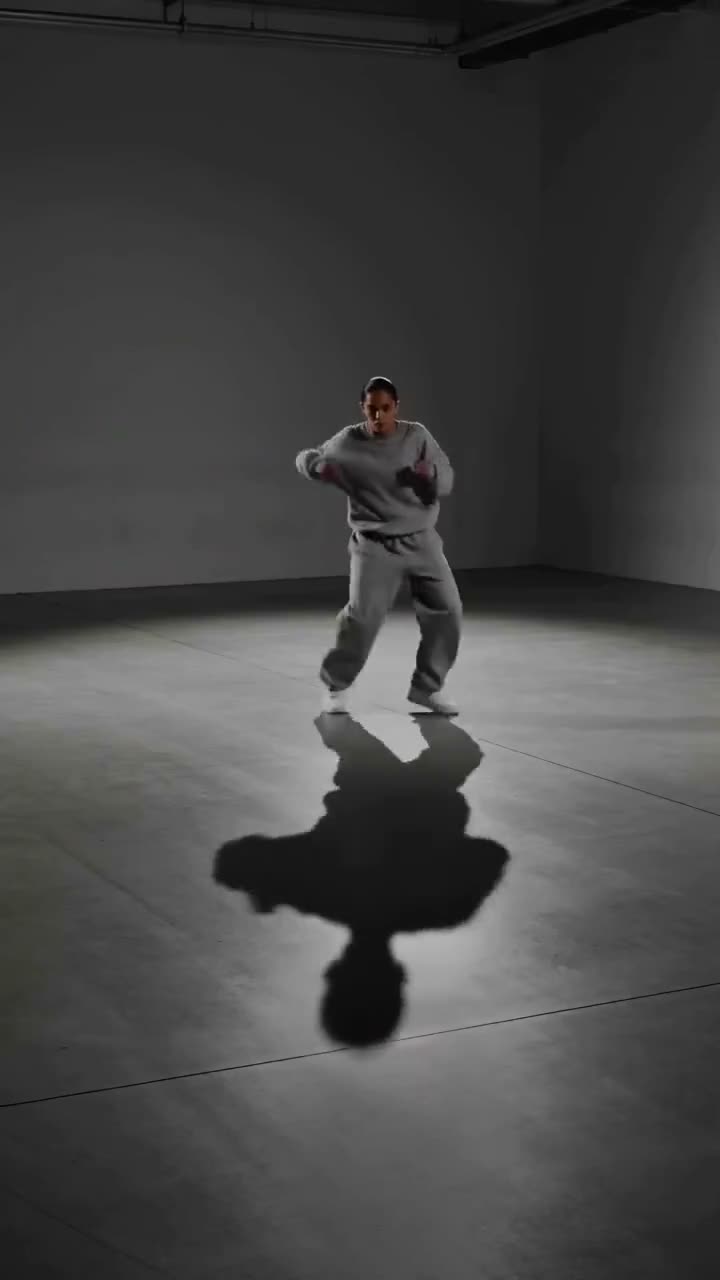
To use Hailuo 2.3, open the Video studio, click the Model card and choose MiniMax Hailuo 2.3, drop your photo into Start frame, write in the Prompt how it should move, and press Generate Video. MiniMax Hailuo 2.3 animates a picture only and sets the clip length itself, so every run costs 90 credits. MiniMax Hailuo 2.3 Fast costs 40 credits for 6 seconds and 60 for 10. To start from text instead, pick MiniMax H3: 50 credits for 5 seconds at 480P.
Hailuo is MiniMax's video model, known for big, energetic motion such as dance, sport and action, and for expressive faces. This guide covers the three MiniMax models in the studio, what each takes, how to prompt them and what they cost.
What you need
- A photo to animate for MiniMax Hailuo 2.3 or MiniMax Hailuo 2.3 Fast, already cropped to the shape you want: the clip takes its shape from it.
- If the photo shows a real person, use your own photo or one you have that person's permission to animate.
- A Kinoseed account and some credits. Video starts with a plan; the $10 Basic plan (500 credits a month) covers 5 MiniMax Hailuo 2.3 clips.
Step by step
- 1
Open the Video studio and choose MiniMax Hailuo 2.3
Click the Model card and pick MiniMax Hailuo 2.3, or MiniMax Hailuo 2.3 Fast for a lower price. The Hailuo 2.3 model page opens the studio with it already selected.
- 2
Add your photo as the Start frame
The Start frame slot is marked Required for both Hailuo models, since they only animate a picture. Crop it first: the clip comes out in the shape of the photo whatever shape button is selected, so a tall photo gives a tall clip for Reels and TikTok.
- 3
Write the motion in the Prompt
Describe what moves, not what the photo already shows: "she spins and her skirt flares out", "the runner pushes off the blocks". One action and one camera move work best.
- 4
Check the length and the price
MiniMax Hailuo 2.3 decides the length itself, so its price stays at 90 credits. On MiniMax Hailuo 2.3 Fast, pick 6 or 10 seconds under Duration: 40 or 60 credits. The price is on the button.
- 5
Press Generate Video
The clip lands in the feed beside the controls, ready to download, with no watermark. A failed run is refunded automatically.

Prompts to copy
Paste any of these into Video studio as a starting point, then change the details to fit your photo.
Dance from a photo
She steps forward into a sharp hip-hop move, arms snapping out on the beat, hair flying. The camera stays at chest height and pushes in slightly.
Sport
The skateboarder pops an ollie off the curb and lands clean, the board clacking down. Low angle tracking shot alongside him.
Text to video on MiniMax H3
A red kite swoops and dives over a windy green hill under fast moving clouds, a child running below holding the string. Wide shot, bright afternoon light.
What each MiniMax model costs
MiniMax Hailuo 2.3: 90 credits a clip, from a photo. MiniMax Hailuo 2.3 Fast: 40 credits for 6 seconds and 60 for 10, from a photo. MiniMax H3: from text or a photo, 5 or 10 seconds in 16:9, 9:16 or 1:1; 5 seconds is 50 credits at 480P, 55 at 768P and 120 at 2K. None of them has a Sound switch. See pricing for the plans.
Which one to pick
Use MiniMax Hailuo 2.3 Fast to try a move on a photo, MiniMax Hailuo 2.3 for the take you keep, and MiniMax H3 when there is no photo or the clip has to end on a set picture: it takes an End frame too. For gentle, slow motion such as a portrait breathing or a product turning, a Seedance or Kling model often looks calmer; see how to turn an image into a video.
More examples
Tips for better results
- Pick a photo where the body has room to move: arms and feet inside the frame, space around the person.
- Name the action with verbs: spins, jumps, kicks, throws. Hailuo answers motion words more than mood words.
- Draft on MiniMax Hailuo 2.3 Fast, then rerun the photo and prompt that worked on MiniMax Hailuo 2.3.
- 768P on MiniMax H3 costs little more than 480P, so it is the setting to start from for social clips.
- For an exact routine, use Motion Control with a clip of the moves instead of a prompt.
Frequently asked questions
Where can I use Hailuo 2.3 online?
In the Kinoseed Video studio: pick MiniMax Hailuo 2.3 or MiniMax Hailuo 2.3 Fast on the Model card and add a photo as the Start frame.
Can Hailuo 2.3 make a video from text?
Not in Kinoseed: MiniMax Hailuo 2.3 and MiniMax Hailuo 2.3 Fast animate a photo. For text to video from MiniMax, pick MiniMax H3, the model after Hailuo 2.3.
How much does Hailuo 2.3 cost?
Video starts with a plan. MiniMax Hailuo 2.3 costs 90 credits a clip; MiniMax Hailuo 2.3 Fast 40 credits for 6 seconds or 60 for 10. The exact price is on the Generate Video button.
Does Hailuo 2.3 make sound?
No, the clips are silent. Add music or a voice in your editor, or use a model with a Sound option such as Kling 3.0 or Veo 3.1.
Try it on your own shot.
Video studio is open to explore. The price of a run is on the button before you spend anything.