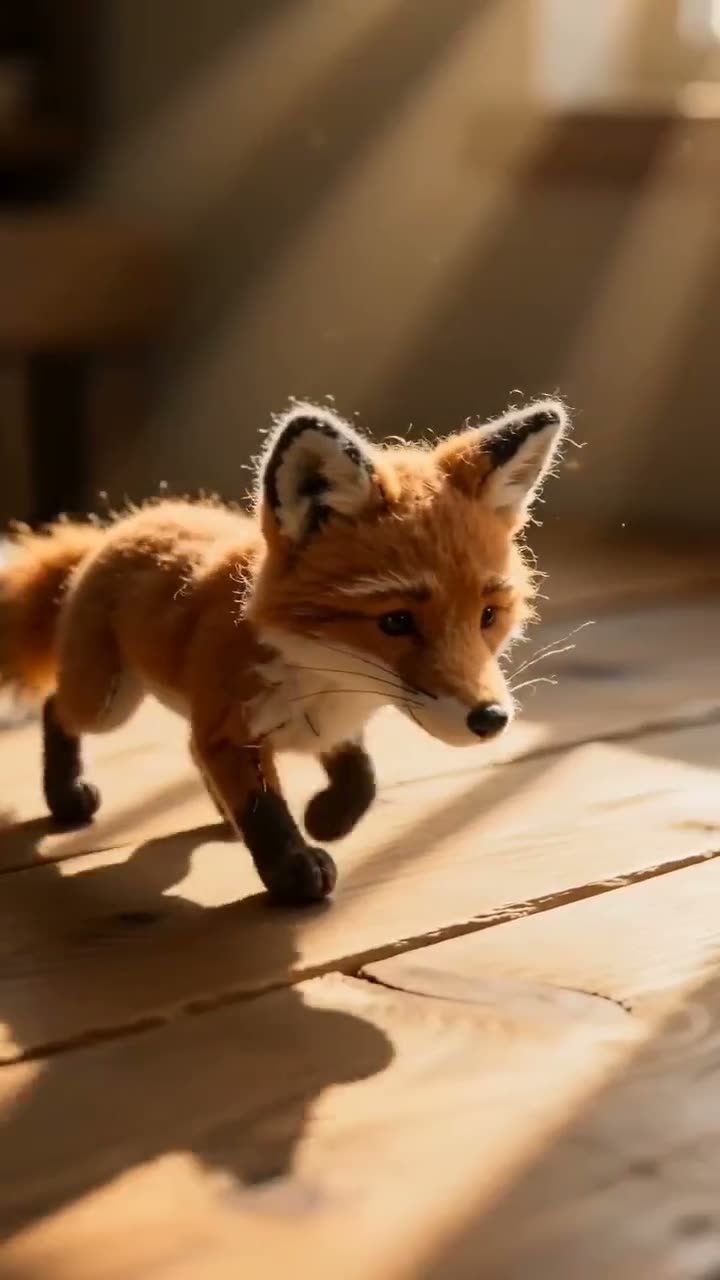
To turn your pet into a plushie video with AI, upload a photo of your pet to Plush Toy Video, choose what the toy is Made of and what it is Doing, then press Generate Video. Seedance 2.0 Mini remakes your pet as a soft toy, with its colours and markings sewn into fabric panels, and animates it in a short stop-motion style clip. A 5 second clip at the default 480p costs 70 credits.
Pets are what the tool's own guide recommends, because fur patterns translate straight into fabric. This article goes through each control, with what the fabric and action options actually change.
What you need
- One clear photo of your pet, ideally with its whole body and markings visible.
- A Kinoseed account with 70 credits for a default clip. Video needs a plan; the $10 Basic plan (500 credits a month) covers it.
Step by step
- 1
Upload photo
Open Plush Toy Video and drop your pet's photo into the Upload photo slot. A person or an object works too, but pets come out best: distinct markings like a white chest or striped tail become distinct fabric panels.
- 2
Pick what it is Made of
Felt, Knitted or Long pile. Felt is neat and toylike with visible stitching and button eyes, Knitted is chunky hand-knitted wool with a slightly lumpy shape, and Long pile is long fluffy fabric that moves as the toy does.
- 3
Choose what it is Doing
Waddling, Waving, Tumbling or By a pumpkin. Waddling sends it across a sunlit wooden desk and has it stop to look up at the camera, Waving sits it up to wave one soft arm, and Tumbling tips it over onto its back with its legs in the air. Waddling is the safest first try.
- 4
Set Aspect, Length and Res
Aspect starts on 9:16, the shape for TikTok, Reels and Shorts. Length is 5, 8 or 10 seconds, and Res runs from 480p up to 720p. The button's credit count follows every change.
- 5
Press Generate Video
70 credits for 5 seconds at 480p. The clip appears in the feed, ready to download, with no watermark. If a run fails, the credits come back automatically.
Plush Toy Video
Adorable plushie animation
Open in appSign in to generate. The price of a run is on the button.
Why the toy looks like your pet
The prompt behind Plush Toy Video does not ask for your pet in a costume. It describes a toy made entirely of fabric, with sewn seams and an embroidered face, whose colours, markings and rough proportions come from your photo. That is why the result reads as a plushie of your pet rather than your pet with fuzzy edges.
What it costs
5 seconds at 480p costs 70 credits, and the same length at 720p costs 150. The Starter plan's 1,200 monthly credits cover 17 default clips. Every plan includes every tool; see pricing.
More examples


Tips for better results
- Use a photo where the markings are clear. A pet curled up in shadow gives the model less to turn into fabric than one standing in daylight.
- Keep the action simple. Short clips read best with one movement, which is why Waddling is the default.
- Draft at 480p. Settle the fabric and action at the default, then render your favourite at 720p.
- Want the pet itself in a moving shot instead? Turn the photo into a video with Image to Video.
Frequently asked questions
What does a plushie video of my pet cost?
Generating starts with a plan. The cheapest Plush Toy Video clip costs 70, which the $10 Basic plan (500 credits a month) covers. The price is on the Generate Video button before you press it.
Does it work with people or objects?
Yes. The upload slot takes a person, a pet or an object. Pets tend to work best because their markings map neatly onto fabric panels.
Can I get a still plushie image instead of a video?
Plush Toy Video always returns a video. To get a still, pause the clip on the frame you like and take it from there, or describe a plush toy version of your pet in the Image studio.
Is there a watermark?
No. Results never carry a watermark, on any plan.
Try it on your own shot.
Plush Toy Video is open to explore. The price of a run is on the button before you spend anything.