AI Virtual Try-On: change the outfit in any photo
One photo, a different wardrobe. Same person, same pose, same room: new clothes.
Sign in to start generating
How to swap an outfit
- 1
Upload the person
A shot where the body is visible works best: the model has to put clothes on a shape it can see.
- 2
Choose wardrobe and cut
The outfit sets the register, the cut sets how it sits. Both are about the garment, never the person.
- 3
Generate a set
Two or four at once gives you variations of the same brief to choose between.
Outfit Swap examples
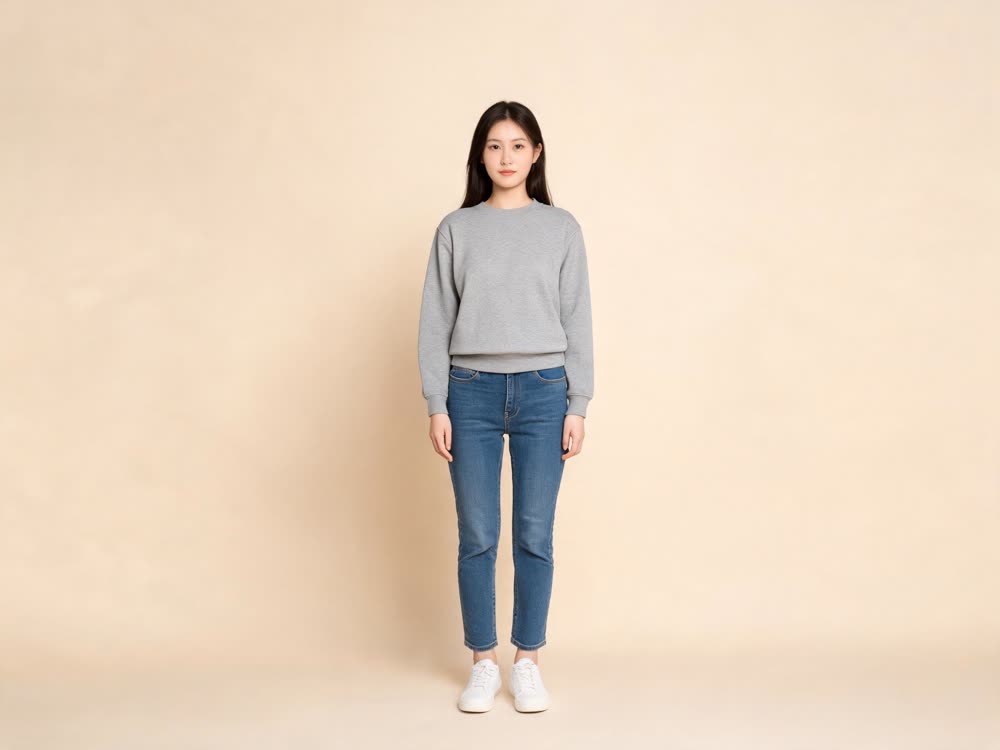
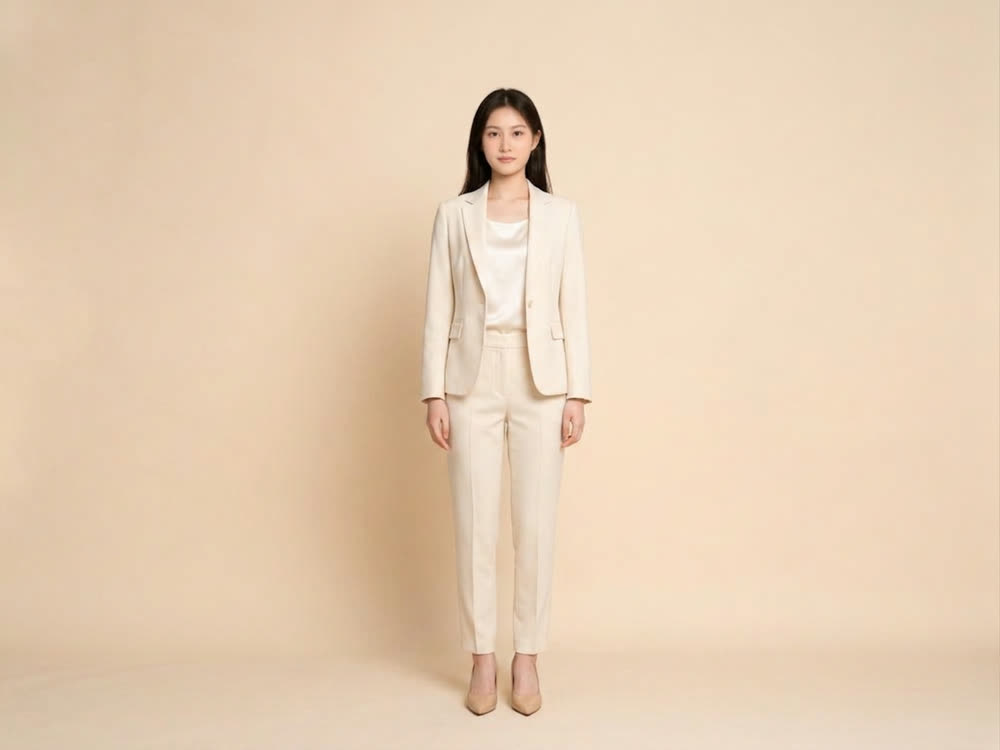
A photo of a person goes in and the same person comes back in different clothes. Face, hair, pose, backdrop and light are kept; only the outfit changes. This example was made from a written outfit description; the tool itself runs Nano Banana 2 on your photo with its wardrobe presets.
- ◂▸OriginalNew outfit
A full-length studio shot on a beige backdrop: a grey sweatshirt, jeans and white sneakers become a cream trouser suit with a silk top and heels. Same woman, same stance.
What runs it
Nano Banana 2
Google's image editing model redresses the person in your photo and is told to keep their face, pose, framing, background and lighting exactly as they are.
A wardrobe and a cut
Pick one of eight outfits (Tailoring, Streetwear, Evening, Outdoor, Knitwear, Athleisure, Linen, Leather) and a cut: true to size, oversized or fitted.
Variations in one run
Ask for 1, 2 or 4 images at once in 1:1, 4:5, 3:4 or 9:16, and pick the one where the garment sits best.
What people use it for
Try a look before you buy it
See yourself in tailoring or streetwear from one full-length photo, without a fitting room.
Styling directions for a shop or brand
Take one model photo through several wardrobe registers to brief a shoot, plan a lookbook or test which mood suits your audience. It uses the preset outfits, not a photo of your own garment.
Fresh posts from one shoot
Get several outfits out of a single portrait session for social posts, with the same face, pose and background in each.
Character and costume ideas
Try a character in evening wear, outdoor kit or leather before you commit to a look for a story, a game or a video.
What it costs
One image costs 16 credits, the default set of 2 costs 30, and four cost 60. The $10 Basic plan (500 credits a month) covers 16 runs at the default, and Starter's 1,200 monthly credits cover 40.
Often used with Outfit Swap
Outfit Swap: questions and answers
›What does Outfit Swap cost?
Generating starts with a plan; the cheapest is the $10 Basic plan (500 credits a month). A single image costs 16 and the default of 2 costs 30, so the $10 Basic plan (500 credits a month) covers 16 runs at the default. There is no watermark on the results.
›Can clothing sellers use it for product photos?
Only for styling ideas, not for listing a specific item. Outfit Swap dresses the person in its preset outfits, so it cannot show your own garment. Kinoseed's terms say you keep ownership of the outputs you generate, subject to the terms of the underlying model providers, and you need the rights to the photo and the person's permission.
›What size are the outfit swap images?
Each image comes back at about 1 megapixel (1K) in the aspect you pick. For print or a larger listing image, run it through Image Upscale, which enlarges it 4x for 3 credits.
›How do I try on clothes virtually with AI?
Upload a full or half-body photo, pick an outfit and a cut, and generate. Nano Banana 2 changes the clothes while your face, pose, framing, background and light stay the same.
›Which outfits can I try?
Tailoring, Streetwear, Evening, Outdoor, Knitwear, Athleisure, Linen and Leather, each in a True to size, Oversized or Fitted cut. The cut matters because the same garment reads very differently oversized versus fitted.
›Can I upload a specific garment to try on?
Not in Outfit Swap, which works from its wardrobe presets. To put several looks on one person, Fashion Factory generates a set of outfits on the same character.
›Can I get several outfit variations at once?
Yes. You can ask for 1, 2 or 4 images per run, in 1:1, 4:5, 3:4 or 9:16. The Generate button shows the total cost for the count you pick.
›What photo works best for an outfit swap?
A shot where the body is visible, full or half length, because the model has to put clothes on a shape it can see. Uploads can be PNG, JPG or WEBP.
Articles about Outfit Swap
- How to Change Clothes in a Photo with AI · Try on a new outfit from a single photo. Same person, same pose, same background, different clothes. A guide to AI outfit swapping.
Start with Outfit Swap
Plans from $10 a month, cancel anytime. Failed runs are refunded.
Open Outfit Swap